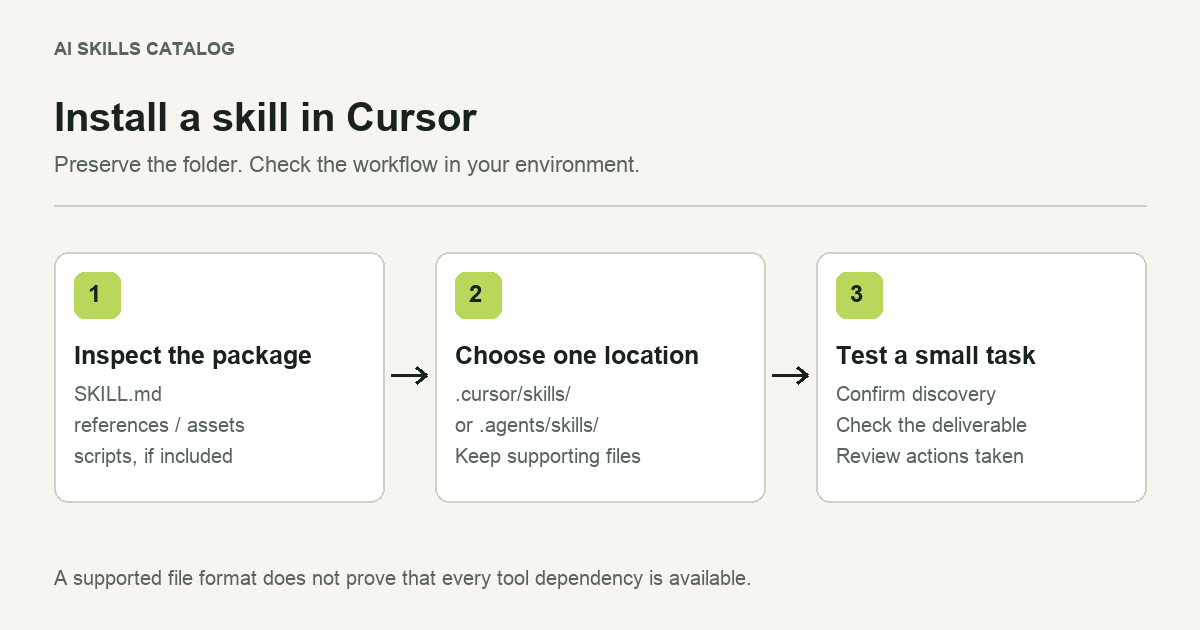
You have found a useful Claude skill and want to use its workflow in Cursor. Start by looking at the files. A folder containing SKILL.md is an agent skill; a Cursor project rule is a different artifact. You can install a compatible skill directly without turning its instructions into a rule.
The useful question is whether Cursor has the tools and context that the workflow expects. A writing checklist may transfer easily. A release procedure that calls a specific integration needs more work.
1. Inspect the download before copying it
Download the package and extract it into a temporary folder. Find the directory that contains SKILL.md. Keep that directory together with its references, templates and scripts. Copying only the Markdown file can leave instructions pointing to missing files.
For example, a package may contain this structure:
research-plan/
  SKILL.md
  references/
    interview-guide.md
  assets/
    research-plan-template.md
This is an illustrative folder, not a promise about every download. Check the package you actually received. Some skills are one file; others depend on several resources.
2. Put the folder in a project skill directory
For a skill you want to share with a project, use .cursor/skills/ or the shared .agents/skills/ directory. The result should look like .cursor/skills/research-plan/SKILL.md. Avoid an extra wrapper folder between the skill directory and its contents.
Choose one location for this copy. Installing the same skill in several supported directories makes updates harder to track and can leave you testing an older copy.
Open the project in Cursor and check the available skills in Agent chat. You can search for the skill using the slash menu. If it is missing, first inspect the folder path and the YAML block at the top of SKILL.md. Check that the skill has a name and a useful description.
3. Read for client-specific assumptions
Before a real task, read the workflow as if you were handing it to a colleague using a different computer. Which steps require a terminal? Does it name a connector you have not installed? Are there references to local files belonging to the original author? Does it assume a particular browser, database or deployment environment?
A directory can be discovered correctly while the task inside it remains impossible to complete. Installation proves that the files are in a supported place. It does not prove that an external service is connected or that a command is appropriate for your repository.
If you maintain an adapted copy, record your changes separately from the upstream version. Keep the original source link and license. That makes it possible to compare a later update without guessing which instructions you changed.
4. Test one observable result
Use a small example with a clear deliverable. For a research planning skill, ask for a plan using a short fictional product brief. Ask the agent to identify missing inputs and produce the named output. Leave deployment, customer data and production credentials out of this first check.
Use the research planning skill to turn this sample brief into a draft research plan. Identify missing inputs, use the bundled template if it is relevant, and do not run external services.
Inspect the result against the instructions. Did the agent use the expected template? Did it preserve the scope? Did it report a missing tool instead of pretending that the step succeeded? A plausible answer is less useful than a result you can check.
When a Cursor rule is the better choice
Keep stable project conventions in a rule: where components belong, which formatting command the team uses, or which generated files should stay untouched. Use a skill for a procedure you call for a particular task. Our comparison of skills and Cursor rules walks through that decision.
Browse the Cursor skill directory for candidates, then evaluate the source and the actual package. A compatibility label helps you narrow the search; your small test tells you whether the workflow fits.